
When I started my Software Engineering degree, I did not even know what programming really was. I still remember sitting in class and hearing words like variable, loop, function, and syntax. Everyone around me looked like they understood something. I was just trying to figure out what was happening.
My first programming language was C, and I struggled with it at the beginning. Most of my struggles were not caused by programming itself. They came from a few beginner mistakes that nobody warned me about. I often got stuck on small mistakes and thought programming was only for geniuses. But over time, I learned that programming is not magic, it is practice.
Today, I work as a programmer. I write tutorials at Syntax Scenarios, work with full-stack development, AI/ML, and even advanced languages like Rust. But I did not start here. I started from zero.
So if you are starting programming in 2026 and you feel confused, slow, or behind, this article is for you. I will share the advice I wish someone had given me when I was a beginner.
Key Takeaways
- You do not need to be a genius to become a programmer.
- Start with basics before jumping into advanced topics.
- Pick one language and stay with it for some time.
- Dry run your code on paper to build logic.
- Build small projects and practice solving coding problems instead of just watching tutorials.
- Use AI only for learning, not for solving problems for you.
- Learn Git, GitHub, debugging, and communication.
- Your first goal is not perfection. Your first goal is consistency.
Why Becoming a Programmer in 2026 Is Still Worth It
Many beginners ask this question: “Is programming still worth learning in 2026?”
My honest answer is yes. But the meaning of programming has changed. Before, many people thought programming only meant writing code. In 2026, programming is more than that. It is about solving problems, building useful tools, understanding systems, and knowing how to work with AI instead of being replaced by it.
The demand is still strong. According to the U.S. Bureau of Labor Statistics, jobs for software developers, QA analysts, and testers are projected to grow 15% from 2024 to 2034, with about 129,200 openings each year on average. The same source reported the median annual wage for software developers as $133,080 in May 2024.
A 2026 software engineer salary report by Lemon.io also analyzed 2,500+ real contracts across 71+ countries and found a $44.9/hour median global developer rate, with AI engineers listed as the highest-paid stack in their data.
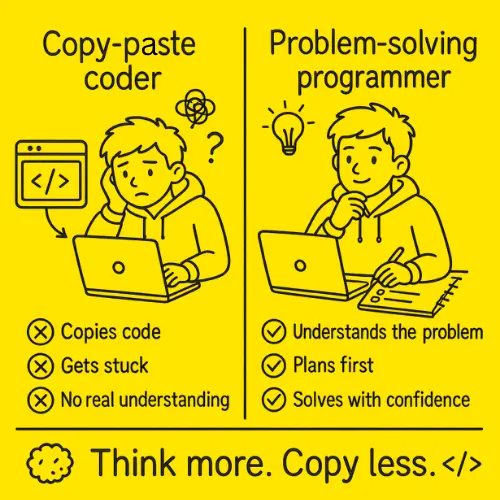
So no, programming is not dead. But basic copy-paste coding is not enough anymore. You need strong basics, real projects, and the ability to think clearly. That is what this article is about.
Advice 1: Start With the Basics, Even If They Feel Boring
When I started programming, I wanted to build big things fast. I wanted to make apps, websites, and smart systems. But I was still confused about small things like:
What is a variable?
How does a loop work?
Why do we use functions?
What is an array?
Why is my condition not working?
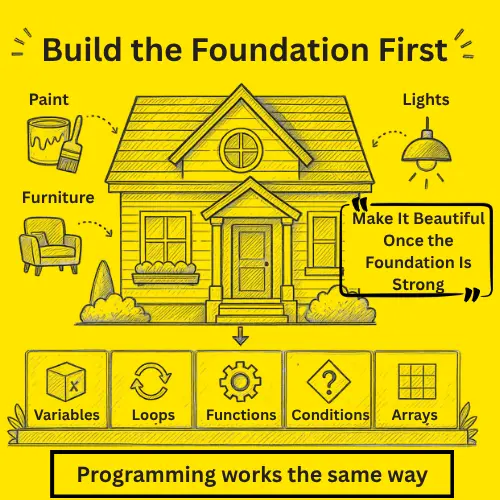
At that time, I used to think basics were boring. But later, I understood that basics are the most important part of programming. If your basics are weak, every advanced topic will feel difficult. Before jumping into AI, web development, mobile apps, or blockchain, first learn the core concepts properly. Start with simple topics like variables, data types, conditions, loops, functions, arrays, strings, input/output, and basic problem-solving. These topics may look small, but they are the base of every programming language.
I still remember how my teacher, Fariba Laiq, used to focus on helping us understand the logic behind a problem instead of just writing code. At the time, it felt difficult, but later I realized how important those fundamentals were. She is also the founder of Syntax Scenarios, and her scenario-based approach to teaching made programming more practical, enjoyable, and easier to understand.
Even now, when I work with full-stack development, AI/ML, or Rust, the same concepts are still used. Only the syntax changes. The logic and thinking remain the same.
It is just like building a house. You cannot start with paint, furniture, and lights if the foundation is weak. Programming is the same. First make your foundation strong, then you can build anything on top of it.
Advice 2: Pick One Language and Stay With It
My first programming language was C.
Was it easy? No, not at all.
But C helped me understand programming in a better way. It taught me how variables work, how memory is used, how loops run, and how functions behave. It also made me careful, because C does not hide your mistakes.
As a beginner, you may hear different advice from different people.
Some will say, “Learn Python.”
Some will say, “Learn JavaScript.”
Some will say, “Learn Java.”
Some will say, “Learn Rust.”
Some will say, “AI is the future, so learn machine learning.”
All of this can become confusing. My advice is simple. Choose one language and stick with it for some time. Do not keep jumping from one language to another.
- You can start with Python if you want an easier beginning.
- You can learn JavaScript if you are interested in web development.
- You can start with C if you want to understand programming at a deeper level.
- You can also choose Java if you want to understand object-oriented programming well.
The language is important, but it is not everything. Your main goal should be to learn how to think like a programmer. When your logic becomes strong, learning another language becomes much easier.
For example, I started with C. Later, I moved towards full-stack development, AI/ML, and Rust. But if I had kept changing languages every few days, I would not have built a strong base.
So do not run after every new language. Pick one language, practice it, build small programs with it, make mistakes and fix those mistakes. This is how you slowly become better at programming.
Advice 3: Do Not Just Watch Tutorials, Practice Every Day
Watching coding tutorials on YouTube helped me a lot when I started learning programming.
YouTube made it easier for me to understand new concepts but it alone did not make me a programmer, practice did.
A big mistake beginners make is watching a tutorial and feeling like they understand everything. But when they open the editor, they cannot write the same code without help. I have been there. You watch someone solve a problem and it looks easy, but when you try it alone, your mind suddenly goes blank.
That is normal. Watching is not the same as doing. If you watch a 20-minute tutorial, spend at least 40 minutes practicing it. Do not only copy the code, change it.
For example, if the tutorial makes a program to add two numbers, try to change it into:
- Subtract two numbers
- Find the largest number
- Check even or odd
- Make a simple calculator
- Add input validation
Small changes make your brain work and that is where real learning happens. When I was learning, I practiced every code question I could. Even if the question looked small, I still solved it. That habit helped me build logic slowly.
If you are looking for practice questions, try solving scenario-based problems instead of only repeating textbook exercises. They feel more like real situations, make you think about the logic, and are often more enjoyable to solve. At Syntax Scenarios, we have created collections of C, C++, and Python practice questions with detailed solutions and explanations to help beginners learn by doing.
You do not become good by watching 100 tutorials, you become good by solving 100 small problems.
Advice 4: Dry Run Code With Pen and Paper
One of the best habits that helped me improve my logic was dry running code with pen and paper.
When my logic was weak, I used to get confused while reading code. I did not understand how values were changing or why the output was different from what I expected. Then I started dry running code on paper, and it really helped me.
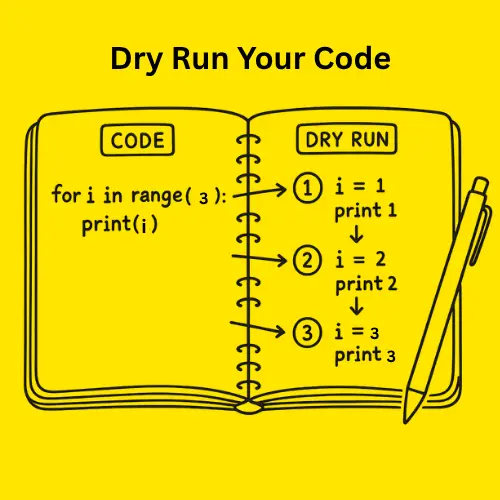
Dry running means checking the code step by step without running it on the computer. You read each line carefully, write the values of variables on paper, and see how they change after every step. It is like running the code in your mind before running it on the screen.
For example, consider this code:
int x = 5;
x = x + 2;
x = x * 3;
On paper, you can write it like this:
- x = 5
- x = 7
- x = 21
This may look very simple, but it trains your brain to understand what the computer is doing.
Dry running is very helpful when you are learning loops, conditions, arrays, functions, recursion, sorting, searching, and debugging.
In the beginning, I used pen and paper a lot. Whenever I did not understand a program, I wrote it down and checked it line by line. Slowly, I started understanding how the code was working.
Many beginners avoid dry running because it feels slow and boring but this slow practice makes your logic strong. if you find pen and paper difficult at first, you can use the Syntax Scenarios Code Visualizer to see your code run step by step. It helps you understand how values change after each line, which makes dry running easier to learn.
So whenever you are stuck, do not just keep running the code again and again. Take a paper, write the values step by step, or open the Syntax Scenarios Code Visualizer and see how the values change. This small habit can improve your programming logic a lot.
Advice 5: Build Small Projects Before Big Projects
My first real project was a simple Hospital Management System. It was not a big professional app. It was very simple, but it taught me many important things.
Through that project, I learned how to think about patients, doctors, records, appointments, data storage, menu options, user input, and the basic flow of a program. That project helped me understand how programming concepts are used in real life.
This is why projects are very important. When you follow a tutorial, most of the work is already planned for you. But when you build your own project, you have to think on your own. You have to decide what to add, how the program should work, and what should happen next.
As a beginner, do not start with a very big project like a full social media app, a complete e-commerce website, an AI chatbot with payments, or a Netflix clone with all features. These projects sound exciting, but they can become too difficult in the beginning. You may get tired and leave them unfinished.
Start with small projects first. You can build simple projects like a calculator, to-do list, number guessing game, student record system, hospital management system, library management system, expense tracker, quiz app, weather app, or a simple portfolio website.
Your first project does not need to be perfect or unique, it just needs to be completed. A small finished project is much better than a big project that you never complete.
Advice 6: Learn Debugging Early
When beginners see errors, they panic. I also used to panic. Sometimes, I would see a long error message and think the whole program was broken, but later I learned that error messages are not enemies, they are hints.
A programmer spends a lot of time fixing errors, so if you want to become a programmer, you must become comfortable with debugging.
Start with simple habits:
- Read the error message slowly
- Check the line number
- Look for spelling mistakes
- Check brackets and semicolons
- Print variable values
- Test one part at a time
- Search the exact error online
- Ask why the error happened, not just how to remove it
Debugging teaches you more than perfect code. Every error you fix makes you better.
Advice 7: Use AI for Learning, Not for Escaping Practice
In 2026, AI tools are everywhere. You can ask AI to write code, fix errors, build projects, and even give full solutions within seconds. But if you are still learning programming, my advice is simple:
“Do not use AI to solve every coding problem for you.”
Try to use your own brain first. Read the problem, think about it, write the code yourself, make mistakes, dry run it on paper, try different ways, and stay stuck for some time.
That struggle is not a waste of time. It is actually the part where your logic becomes stronger.
You can use AI to learn better. For example, you can ask AI to explain a topic in simple words, explain why an error happened, give you practice questions, explain a loop or function, or review your code after you have tried it yourself. But do not ask AI to directly solve the whole problem when you are still learning.
If AI solves every problem for you, you may complete the task, but your brain will not learn how to solve it.
Later, when your programming skills become stronger and you can understand what AI has written, then you can use AI more freely.
At that stage, AI becomes a helpful assistant but in the beginning, AI can easily become a shortcut, and that shortcut can make your logic weak.
So use AI to understand things better. Do not use AI to avoid thinking.
Advice 8: Learn Git and GitHub Earlier Than I Did
Many beginners delay learning Git and GitHub. They think, “I will learn it later.” But I think you should learn the basics as early as possible.
You do not need to become an expert in the beginning. You just need to understand the simple things, like what Git is, what GitHub is, how to save your code, how to make commits, how to upload projects, and how to create a simple README file.
GitHub is like your public coding diary. When you build projects and upload them on GitHub, you are creating proof of your learning. It shows that you are practicing and improving step by step.
This can help you when you apply for internships, show your portfolio, work with a team, track your progress, or come back to old projects later.
Even your small projects are worth uploading. Do not wait until your code is perfect, start sharing your learning journey early.
Advice 9: Do Not Ignore Communication Skills
Programming is not only about writing code. You also need to explain your code, your ideas, and your problems in a clear way.
I learned this from my own experience. At one point, I was good at programming, but my communication skills were weak. I did not enjoy talking to people much. I was the kind of person who wanted to sit in a corner, wear headphones, and avoid unnecessary conversations.
In the beginning, I thought this was okay because my code was good, but later, I understood that this habit was limiting me.
In real work, coding skills alone are not always enough. You may know how to solve a problem, but if you cannot explain your solution, ask good questions, or discuss your ideas with a team, you may miss many good opportunities.
When I started improving my communication skills, things slowly changed. I became better at explaining bugs, felt more confident in discussions, understood people’s needs more clearly, and slowly started seeing more opportunities come my way.
In real work, you may need to explain a bug, write documentation, talk to a client, discuss ideas with a team, ask for help, review someone’s code, or explain your project in a meeting.
So yes, coding skills are important, but communication skills are also important.
You can improve your communication by doing small things every day:
- Interact more with your teammates
- Ask questions when you are stuck
- Explain your ideas in team discussions
- Prepare short presentations about your work
- Speak with confidence, even if you are not perfect
- Share your progress instead of staying silent
- Learn how to explain technical things in simple words
You do not need to become the loudest person in the room. You just need to become clear, confident, and easy to work with.
Advice 10: Be Consistent, Not Perfect
I know this sounds simple, but it is very important. Many beginners quit because they expect fast results. They study for few days, get stuck, and think they are not made for programming.
But programming takes time. There will be days when you feel smart and there will be days when one error makes you question everything.
That is part of the journey. You do not need to code for 10 hours daily. Even 1 to 2 focused hours every day can change a lot over time.
Small daily progress is better than random motivation. I did not become better in one day, I became better because I kept returning to the code.
Step-by-Step Plan to Become a Programmer
Now let’s turn all the advice into a simple action plan. You do not need to follow it perfectly, but this order will help you avoid confusion.
Step 1: Choose One Language
Pick one language and stay with it for some time.
Do not keep switching between languages in the beginning. First, use one language to understand how programming works.
Step 2: Learn the Basic Concepts
Start with variables, data types, conditions, loops, functions, arrays, strings, and input/output.
These topics may look small, but they are the base of everything you will learn later.
Step 3: Practice Small Questions
After learning each topic, solve small questions related to it.
Do not just watch tutorials. Write code yourself, make mistakes, and fix them.
Step 4: Dry Run Your Code
When a program feels confusing, slow down and trace the code step by step. Understanding how the code works is often more important than just getting the correct output.
Step 5: Build Your First Small Project
Once you know the basics, build one small project. It can be a calculator, quiz app, student record system, to-do list, hospital management system or any other small project of your own choice.
The goal is not to make something perfect, the goal is to finish something.
Step 6: Choose One Path
After the basics, choose one direction. You can go into web development, app development, AI/ML, data science, DevOps, cybersecurity, systems programming or any other path of your own choice.
Pick one path based on what you enjoy, but do not worry too much. Your path can change later.
Step 7: Build 3 to 5 Portfolio Projects
Now build a few better projects related to your path.
Try to add your own ideas instead of copying a tutorial exactly.
Step 8: Learn Git, GitHub, and Communication
Upload your projects to GitHub and learn how to explain your work clearly.
This will help you in interviews, teamwork, freelancing, and real jobs.
Step 9: Start Applying
Apply for internships, freelance work, open-source projects, or entry-level roles. You do not need to know everything before you start gaining real-world experience.
What I Would Do Differently If I Started Again
If I started programming again from zero in 2026, I would do a few things differently.
- I would practice logic more from the start.
- I would not waste too much time worrying about which language is best.
- I would build small projects earlier.
- I would use GitHub earlier.
- I would learn debugging as a skill, not as a problem.
- I would use AI, but I would not let it replace my own thinking.
- Most importantly, I would stop comparing myself with others. Everyone learns at a different speed. Some people understand topics quickly while others take time. Some people are good at projects but weak in theory while some are good in theory but scared of building. That is normal. Your only competition should be your previous version.
FAQs
Can I become a programmer in 2026 with no background?
Yes, you can. You do not need a strong background to start. I also started without knowing what programming really was. Just follow the plan that I mentioned. The beginning is slow, but it gets easier with time.
Which programming language should I learn first?
You can start with Python, JavaScript, C, C++ or Java . The first language is less important than building strong logic.
How long does it take to become a programmer?
It depends on your time and consistency. You can learn basics in a few months, but becoming job-ready usually takes more time and real practice. If you study daily, build projects, and solve problems, you can make strong progress in 6 to 12 months.
Is AI going to replace programmers?
AI will replace some simple coding tasks, but it will not replace strong problem-solvers easily. Programmers who understand logic, systems, debugging, and real user needs will still be valuable. Use AI as a helper, but keep building your own skills.
Do I need a degree to become a programmer?
A degree can help, but it is not the only way. Many people become programmers through self-learning, bootcamps, projects, and practice. What matters most is your skill, portfolio, problem-solving ability, and consistency.
What project should I build first?
Start with something simple. A calculator, to-do list, quiz app, student record system, or hospital management system is enough. Your first project does not need to be impressive. It only needs to teach you how to build something from start to finish.
Conclusion
Becoming a programmer in 2026 is not about learning everything at once. It is about starting small, understanding the basics, practicing regularly, and building real things step by step.
When I started, I did not know much about programming. I struggled with syntax, logic, and confidence. But with practice, dry running, small projects, and consistency, things slowly started making sense.
So, if you are starting from zero, do not rush the process. Write code yourself, make mistakes, fix them, and keep improving. That is how real programming skills are built. And whenever you want to test your code while learning, you can use the Syntax Scenarios code compiler to run your programs and understand the output more clearly. The goal is not to become perfect in one day. The goal is to keep going until programming starts feeling natural.