
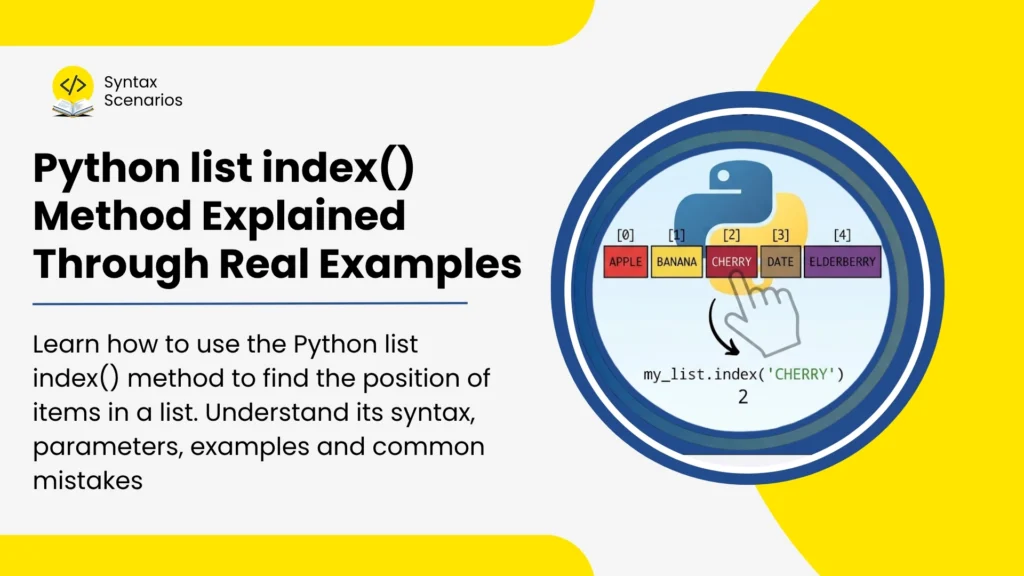

Lists are one of the most useful data structures in Python. They allow you to store multiple values inside a single variable and work with them easily.
However, there are many situations where simply storing data is not enough. You may need to find where a specific item is located inside a list. For example, you might want to find the position of a student’s name in an attendance list, locate a product in an inventory, or identify a user’s position in a collection of usernames.
This is where the Python index() method becomes useful.
The index() method searches a list for a specific value and returns its position. It is simple to use, but understanding how it works can save you a lot of time when working with lists.
In this article, you will learn how the Python list index() method works, how to use its optional parameters, and how to avoid common mistakes using beginner-friendly examples.
Key Takeaways
Here are the most important things you should know:
- The
index()method returns the position of an item in a list. - It always returns the first occurrence of a matching value.
- You can use optional
startandendparameters to limit the search area. - If the item is not found, Python raises a
ValueError. - Python list indexing starts at
0, not1. - The
index()method is useful when you know the value but need its position.
Quick Answer: How to Use index() in Python
Use the index() method on a list and pass the item you want to find.
Example:
fruits = ["apple", "banana", "orange"]
position = fruits.index("banana")
print(position)
Output:
1
Explanation:
- The method searches the list for
"banana"and returns its position. - As index starts from 0,
"banana"is stored at index1, so Python returns1. - This is the quickest way to find the location of an item in a list.
What Does the index() Method Do?
The index() method searches through a list and returns the position of a specified item.
When Python starts searching, it checks each item one by one from left to right. As soon as it finds a match, it stops searching and returns the index.
This makes the method very useful when you know the value you are looking for but do not know where it is stored.
Example:
colors = ["red", "green", "blue"]
print(colors.index("blue"))
Output:
2
Explanation:
In this example Python checks:
- Is
"red"equal to"blue"? No. - Is
"green"equal to"blue"? No. - Is
"blue"equal to"blue"? Yes.
The search stops, and Python returns the index number which is 2. You can see this process step by step using Syntax Scenarios Code Visualiser.
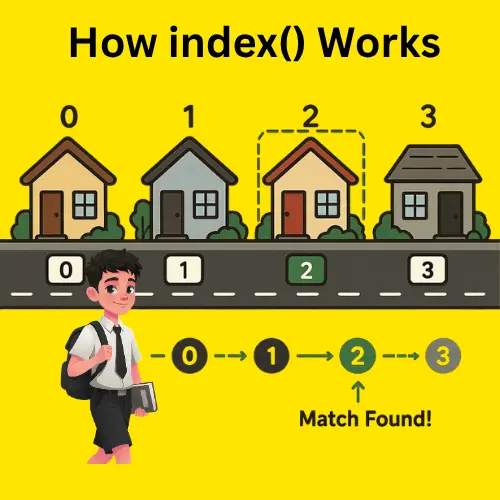
Real-Life Analogy
Imagine you are looking for a friend’s house in a street. you know what your friend’s house looks like, but you do not know where it is located on a street. You start checking houses from the beginning of the street. Once you spot the correct house, you stop searching and note its position.
The index() method works in a similar way. It searches through the list until it finds the item you are looking for and then returns its location.
Python list index() Syntax
list_name.index(element, start, end)
Parameters
| Parameter | Required? | Description |
| element | Yes | The item to search for |
| start | No | Position where the search should begin |
| end | No | Position where the search should stop |
Parameter Explanation
The element parameter is mandatory because Python needs to know what item to search for.
The start and end parameters are optional. If they are not provided, Python searches the entire list.
Most beginners only use the element parameter. The other two become useful when you need to search within a specific section of a large list.
Example 1: Find the Position of a Number
Code:
numbers = [10, 20, 30, 40, 50]
position = numbers.index(30)
print(position)
Output:
2
Explanation:
- Python starts searching from the beginning of the list.
- It checks each value until it finds
30. - Since
30appears at index2, that value is returned.
Example 2: Find the Position of a String
Code:
cities = ["London", "Paris", "Tokyo", "Sydney"]
position = cities.index("Tokyo")
print(position)
Output:
2
Explanation:
The index() method works with strings just as easily as numbers. It can also work with many other data types stored inside a list.
What Happens When an Item Appears More Than Once?
A common misconception is that index() returns every matching position when working with duplicate values in a list.
It does not.
The method only returns the position of the first occurrence.
Example:
scores = [80, 90, 75, 90, 95]
print(scores.index(90))
Output:
1
Explanation:
Even though 90 appears twice, Python returns only the first match.
This happens because the search stops immediately after finding the first occurrence.
Real-Life Analogy
Imagine you are looking for a book in a library. You walk through the shelves until you find the book you want.
Once you find the first copy, you stop looking, even if there are multiple copies available in that library.
The index() method works the same way. It stops searching as soon as it finds the first match.

Using the start Parameter
The start parameter tells Python where the search should begin.
Example:
scores = [80, 90, 75, 90, 95]
position = scores.index(90, 2)
print(position)
Output:
3
Explanation:
Normally, Python would find the first 90 at index 1. However, because the search starts at index 2, Python ignores everything before that position. The next matching value appears at index 3, so Python returns 3.
This is particularly useful when a value appears multiple times and you want to find a later occurrence.
Using Both start and end Parameters
You can search within a specific portion of the list using the start and end parameters together.
Example:
numbers = [5, 8, 12, 15, 8, 20]
position = numbers.index(8, 2, 5)
print(position)
Output:
4
Explanation:
- Python only searches from index
2up to (but not including) index5, which means it checks indexes2,3, and4. - The first
8at index1is ignored because it falls outside the search range. - The second
8at index4is found and returned.
This feature is useful when working with large lists where you only need to search a specific section.
What Happens If the Item Is Not Found?
If Python cannot find the item, it raises a ValueError.
Example:
fruits = ["apple", "banana", "orange"]
print(fruits.index("mango"))
Output:
ValueError: 'mango' is not in list
Explanation:
Many beginners expect Python to return -1 when an item is missing. However, that is not how index() works.
Instead, Python raises an exception to indicate that the requested value does not exist in the list.
How to Avoid ValueError?
A simple approach is to check whether the item exists before calling index(). This can be done using if-else statements.
Example:
fruits = ["apple", "banana", "orange"]
if "mango" in fruits:
    print(fruits.index("mango"))
else:
    print("Item not found")
Output:
Item not found
This approach is safer because it prevents your program from crashing unexpectedly.
It is especially useful when working with user input.
Practical Example: Finding a Student’s Position
Suppose a teacher has a list of students and wants to find the position of a particular student.
Code:
students = ["Ali", "Sara", "Ahmed", "Fatima"]
position = students.index("Ahmed")
print(position)
Output:
2
The result shows that Ahmed appears at index 2.
This type of search is common in attendance systems, examination records, and classroom management applications.
Practical Example: Finding a Product in Inventory
Imagine a warehouse where products are stored on numbered shelves. Instead of walking through every shelf manually, you look up the product and immediately get its shelf position.
The index() method helps you locate items in a list in a similar way.
Code:
inventory = ["Laptop", "Mouse", "Keyboard", "Monitor"]
if "Keyboard" in inventory:
    product_position = inventory.index("Keyboard")
    print(product_position)
else:
    print("Product not found")
Output:
2
Explanation:
The inventory system first checks whether the product exists in the list. If it does, Python finds and prints its position. Otherwise, it displays a message instead of raising a ValueError
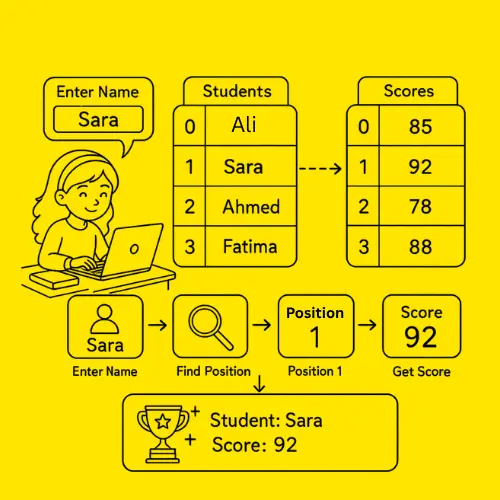
Practical Example: Student Score Finding Program
Imagine creating a student score program where a student enters their name to check their exam score. The program uses index() to find the position of the student’s name in a list of students, then uses that same position to retrieve and display the corresponding score from a separate score list.
Code:
students = ["Ali", "Sara", "Ahmed", "Fatima"]
scores = [85, 92, 78, 88]
entered_name = input("Enter your name: ")
if entered_name in students:
    position = students.index(entered_name)
    print("Student:", entered_name)
    print("Score:", scores[position])
else:
    print("Student not found")
Output:
Enter your name: Sara
Student: Sara
Score: 92
Explanation:
- The
studentslist stores student names, while thescoreslist stores their corresponding scores at matching positions. - When the user enters
"Sara", Python usesindex()to find her position in thestudentslist. The returned index is1, so the program can access Sara’s score from thescoreslist using the same position. - Because both lists are aligned, each student’s name matches the score stored at the same index. This allows the program to quickly retrieve the correct score after finding the student’s position.
The index() method is useful whenever you need to locate an item in one list and use its position to access related information stored in another list.
index() vs List Indexing
Beginners often confuse the index() method with list indexing.
Although they sound similar, they serve different purposes.
index()
index() is used to find the position of a value.
Example:
animals = ["cat", "dog", "rabbit"]
print(animals.index("dog"))
Output:
1
List Indexing
List indexing is used to retrieve a value from a position.
Example:
animals = ["cat", "dog", "rabbit"]
print(animals[1])
Output:
dog
Comparison Table
| Feature | index() Method | List Indexing |
| Purpose | Find a position | Access a value |
| Input | Item value | Index number |
| Return | Position | Actual item |
| Example | animals.index(“dog”) | animals[1] |
Common Mistakes When Using index()
Searching for an Item That Does Not Exist
One of the most common mistakes is trying to find a value that is not present in the list. When this happens, the index() method cannot return a position and raises an error instead.
Example:
numbers = [1, 2, 3]
print(numbers.index(5))
Output:
numbers = [1, 2, 3]
print(numbers.index(5))
Expecting All Matching Positions
Some beginners assume that index() will return every position where a value appears. In reality, the method stops searching after finding the first match.
Example:
numbers = [10, 20, 20, 30]
print(numbers.index(20))
Output:
1
Assuming Python Starts Counting from 1
Another common mistake is forgetting that Python uses zero-based indexing. This means the first item in a list is stored at position 0, not position 1.
Example:
fruits = ["apple", "banana", "orange"]
Positions are:
- apple: 0
- banana: 1
- orange: 2
Confusing Position with Value
It is also easy to confuse the position of an item with the item itself. The index() method returns where the value is located, not the value stored at that location.
Example:
fruits = ["apple", "banana", "orange"]
print(fruits.index("orange"))
Output:
2
FAQs
How do you find the index of an item in a Python list?
To find the index of an item in a Python list, use the index() method and provide the value you want to locate. Python will search through the list and return the position where that value first appears.
What does Python list index() return?
The method returns the index of the first occurrence of a specified value. If multiple matching values exist, only the first position is returned.
Can index() find duplicate items?
It can search for duplicate values, but it only returns the first matching position. To locate later occurrences, use the start parameter.
What happens if index() cannot find an item?
Python raises a ValueError. To avoid this, check whether the value exists using the in operator before calling index().
Is index() available for strings?
Yes. Strings support the index() method and return the position of the first matching character or substring. If no match is found, Python raises a ValueError.
Conclusion
The Python index() method is a simple but powerful tool for locating items inside a list. It helps you quickly find the position of a value without writing manual loops. The method also supports optional start and end parameters, making it flexible enough for more advanced searches.
Whether you are working with student records, inventory systems, usernames, or any other collection of data, the index() method can help you locate information efficiently.
To better understand how it works, try running the examples in the Syntax Scenarios Python Compiler and experiment with different values.
You can also explore more Python tutorials on Syntax Scenarios as you continue your Python learning journey.