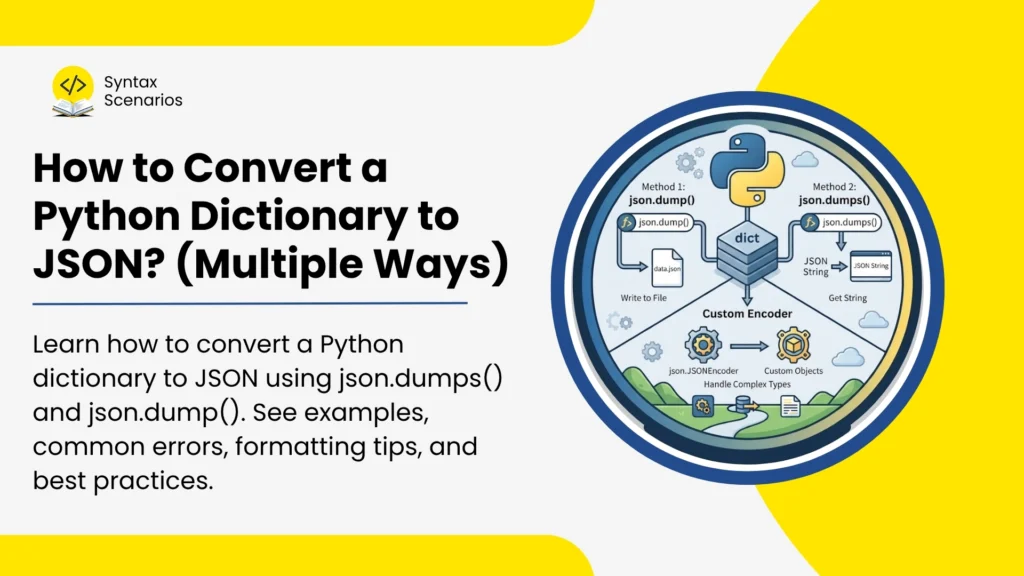

Python dictionaries are commonly used to store data in key-value pairs. However, when you need to send data through an API, save it to a file, or exchange information between applications, JSON is usually the preferred format.
Fortunately, Python makes this conversion simple through its built-in json module.
- Quick Answer: Convert a Python Dictionary to JSON
- What Is JSON in Python?
- What Is the Difference Between a Dictionary and JSON?
- Python json Module Methods
- json.dumps() Parameters and Formatting Options
- Convert JSON Back to a Python Dictionary
- Handle Non-String Dictionary Keys (Important JSON Rule)
- Convert Nested Dictionaries and Lists to JSON
- Common Errors When Converting a Dictionary to JSON
- What Changed in 2026?
- Conclusion
- Try It Yourself
- FAQs
Quick Answer: Convert a Python Dictionary to JSON
To convert a Python dictionary to JSON, use Python’s built-in json module. It gives you two essential options:
json.dumps(: converts a dictionary into a JSON stringjson.dump(): writes a dictionary directly into a JSON file
Example
For example, the json.dumps() function converts the following Python dictionary into a JSON string:
import json

person = {
   "name": "Ayesha",
   "age": 25,
   "city": "Lahore"
}

json_data = json.dumps(person)

print(json_data)
Output:
{"name": "Ayesha", "age": 25, "city": "Lahore"}What Is JSON in Python?
JSON (JavaScript Object Notation) is a lightweight text format used to store and exchange data.
You’ll commonly see JSON used in:
- APIs
- Configuration files
- Web applications
- Cloud services
- AI and machine learning applications
Because JSON is language-independent, it allows Python applications to communicate easily with other systems.
What Is the Difference Between a Dictionary and JSON?
| Feature | Python Dictionary | JSON |
|---|---|---|
| Type | Python data structure | Text format |
| Used In | Python code | APIs, files, web apps |
| Quotes | Single or double quotes | Double quotes only |
| Boolean Values | True, False | true, false |
| Null Value | None | null |
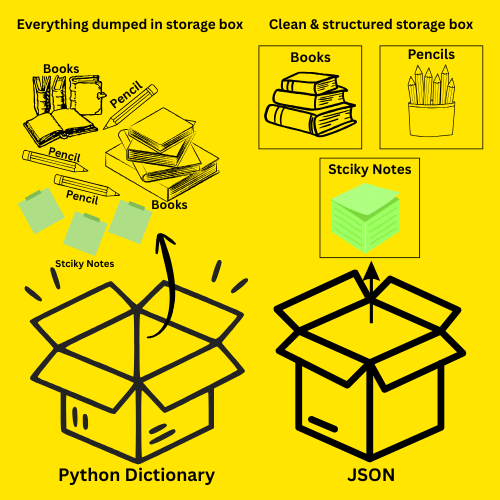
A Python dictionary is like a big container where you dump everything together; items are inside, but not properly organized or labeled in a standard way. Whereas JSON is like a clean, structured storage box where everything is neatly arranged and labeled so anyone can understand it easily. For a deeper understanding of how data structures work, check Data Types in Python with Examples
Python json Module Methods
Below are the most common and beginner-friendly ways to convert a dictionary to JSON using json module.
1. Convert a Python Dictionary to a JSON String Using json.dumps()
Use json.dumps() when you want to send data to an API, print it, or store it as a variable.
Syntax
json.dumps(dictionary)
json: the Python module that works with JSON datadumps: a function injsonthat converts Python objects into a JSON-formatted string- dictionary: the Python object (key-value data) being converted into JSON format
Example
The example converts a Python dictionary data into a JSON-formatted string json_string using json.dumps(). See how True quietly became true? That’s the json module doing the heavy lifting for you. No extra steps needed.
import json

data = {
    "course": "Python",
    "level": "Beginner",
    "is_free": True
}

json_string = json.dumps(data)
print(json_string)
Output
{"course": "Python", "level": "Beginner", "is_free": true}When to Use json.dumps()
Use this method when you want to:
- Send JSON through an API
- Display JSON output
- Store JSON in a variable
- Return JSON from an application
2. Save a Python Dictionary to a JSON File Using json.dump()
If you want a physical .json file, use json.dump(). Unlike json.dumps(), this doesn’t return a string. Instead, it writes the data directly into the file.
Syntax
json.dump(dictionary, file)
json: the Python module used for working with JSON datadump: a function that writes Python data directly to a file in JSON formatdictionary: the Python dictionary being converted to JSONfile: the file object where the JSON data will be saved
Example
This example uses json.dump() to write the Python dictionary data containing information about Syntax Scenarios, Python articles, and the article “How to convert dict to JSON” into a JSON file named website_information.json.
import json

data = {
 	 "website": "Syntax Scenarios",
 	 "category": "Python articles",
 	 "article": "How to convert dict to JSON"
}

with open(website_information.json", "w") as file:
          json.dump(data, file)
Output
Creates a file called website_information.json in your current directory

When to Use json.dump()
Use this method when you need to:
- Create JSON files
- Save configuration settings
- Store application data
- Export information for other systems
json.dumps() Parameters and Formatting Options
1. Make JSON Easier to Read Using indent
By default, JSON appears on a single line. The indent parameter formats the output with spacing and line breaks. This is called pretty-printing. It’s mostly used for debugging or displaying data to humans.
Syntax
json.dumps(data, indent=4)
json: Python module for working with JSON data.dumps: Converts a Python object into a JSON string.data: The Python dictionary being converted.indent=4: Adds 4 spaces for each indentation level, making the JSON output easier to read (pretty-printing).
Example
This example converts a Python dictionary data into a formatted (pretty-printed) JSON string using json.dumps(), adding indentation for better readability. Then the output is printed with structured spacing for nested data like lists.
import json

data = {
    "name": "Sara",
    "skills": ["Python", "Django", "APIs"]
}

print(json.dumps(data, indent=4))
Output
{
    "name": "Sara",
    "skills": [
        "Python",
        "Django",
        "APIs"
    ]
}
2. Sort JSON Keys Alphabetically Using sort_keys
For cleaner output and easier testing, use sort_keys=True. This is especially useful when comparing outputs in tests or logging structured data where key order matters.
Syntax
json.dumps(obj, sort_keys=True)
json: Python module used for handling JSON datadumps: converts Python object (like dictionary) into a JSON stringobj: the Python dictionary or object you want to convertsort_keys=True: sorts the dictionary keys in alphabetical order before converting to JSON
Example
This example converts a Python dictionary into a JSON string and prints it with keys sorted alphabetically. It rearranges the output so the keys appear in order like age, city, name.
import json

data = {
    "city": "Islamabad",
    "name": "Hina",
    "age": 22
}

print(json.dumps(data, sort_keys=True))
Output
{"age": 22, "city": "Islamabad", "name": "Hina"}Convert JSON Back to a Python Dictionary
You can reverse the conversion using json.loads().
Syntax
json.loads(json_string)
json: Python module used for handling JSON dataloads: converts a JSON string into a Python object (usually a dictionary)json_string: the JSON-formatted text that will be converted
Example
This example converts a JSON string into a Python dictionary using json.loads(). After conversion, the data becomes usable in Python as a normal dictionary.
import json

json_data = '{"name":"Ayesha","age":25}'

python_dict = json.loads(json_data)

print(python_dict)
Output
{'name': 'Ayesha', 'age': 25}After converting JSON back into a dictionary, you can access and manipulate its values just like any other Python variable. If you’re new to variables, see Variables in Python Explained with Visuals.
Handle Non-String Dictionary Keys (Important JSON Rule)
In Python, dictionary keys can be numbers, strings, or even tuples. But JSON works differently.
JSON only allows strings as keys.
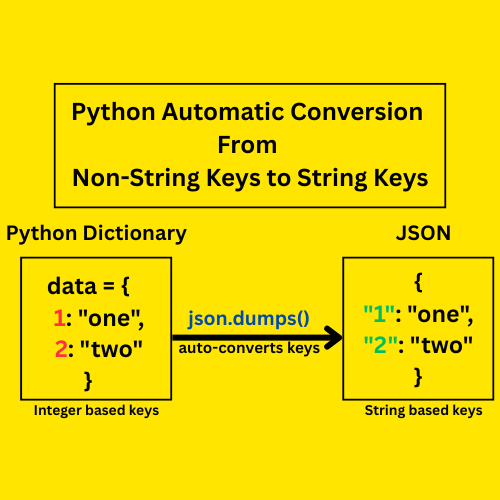
Because of this, Python automatically converts non-string keys (like integers) into strings during conversion.
Example
- Python dictionary keys
1and2are integers. - Since JSON does not support numeric keys.
- So Python automatically converts them into strings
"1"and"2"
import json

data = {
    1: "one",
    2: "two"
}

json_data = json.dumps(data)

print(json_data)
Output
{"1": "one", "2": "two"}This behavior is standard and defined in Python’s JSON serialization rules in the official documentation.
Convert Nested Dictionaries and Lists to JSON
Real-world data is often structured, not simple. A Python dictionary can contain nested dictionaries and lists, such as student records, user profiles, or API responses.
The good news is that json.dumps() handles these nested structures automatically without any extra steps.
Example
Think of a student record system. A student doesn’t just have a name. Instead, they also have marks for different subjects and a list of enrolled courses. This kind of structured data is called a nested dictionary.
This example converts a nested Python dictionary (containing a student’s marks and subjects list) into a properly formatted JSON string using json.dumps(), while preserving the entire structure of nested objects and arrays.
import json

student = {
    "name": "Zara",
    "marks": {
        "math": 90,
        "english": 85
    },
    "subjects": ["Math", "English", "Science"]
}

json_data = json.dumps(student, indent=4)

print(json_data)
Output
{
    "name": "Zara",
    "marks": {
        "math": 90,
        "english": 85
    },
    "subjects": [
        "Math",
        "English",
        "Science"
    ]
}
How Does Python Convert Nested Data?
When converting to JSON:
- Python dictionaries → JSON objects
- Python lists → JSON arrays
- Since nested JSON often contains arrays, understanding Scenario-Based Coding Problems on 1D List in Python can help you work with JSON data more confidently.
- Nested structures are preserved automatically
So in simple terms, Python just “maps” your structure into JSON format without changing the hierarchy.
Common Errors When Converting a Dictionary to JSON
| Error | What Happens | Why It Happens | Fix |
|---|---|---|---|
Forgetting to import json | Python shows NameError: name 'json' is not defined | The json module is not loaded, so Python doesn’t recognize json.dumps() | Always start with import json |
Using json.dump() instead of json.dumps() | You don’t get a JSON string output | json.dump() writes directly to a file, not a string | Use json.dumps() for strings and json.dump() for files |
| Object is not JSON serializable | TypeError: Object is not JSON serializable | JSON only supports basic types (strings, numbers, lists, booleans) | Convert unsupported types (e.g., set → list) before conversion |
What Changed in 2026?
JSON remains the most widely used data exchange format. However, it is now even more important because of:
- AI applications and LLM APIs
- FastAPI and modern Python frameworks
- Cloud-native applications
- Serverless architectures
Many frameworks automatically convert Python dictionaries into JSON responses behind the scenes.
Conclusion
Converting a Python dictionary to JSON is simple once you understand the core tools Python provides. You mainly use json.dumps() to convert a dictionary into a JSON string, and json.dump() to save it directly into a file.
You can also improve your output using indent for readability and sort_keys for cleaner structure. For real-world data, Python automatically handles nested dictionaries and lists, but you may need to convert unsupported types like sets or custom objects.
Discover more Python tutorials, examples, and guides in our Python Syntax Scenarios section.
Try It Yourself
Want to test these examples without any setup? Run the code directly in our free online Python Compiler; no installation required. Just paste and run.
FAQs
How do you convert a Python dictionary to JSON?
Use json.dumps() from Python’s built-in json module. It converts the dictionary into a JSON-formatted string. For example: json.dumps({"name": "Ali"}) returns '{"name": "Ali"}'. No installation needed, the module comes bundled with Python.
What is the difference between json.dump() and json.dumps()?
json.dumps() returns a JSON string you can use directly in your code. json.dump() writes JSON data into a file instead. A simple trick: the “s” in dumps stands for string. Use dumps for in-memory operations, and dump when saving to a .json file on disk.
Can I convert a nested dictionary to JSON?
Yes. json.dumps() handles nested dictionaries automatically, as long as all values inside are JSON-supported types. Just pass the nested dict to json.dumps() and it serializes the entire structure, inner dicts, lists, and all.
Why do Python booleans look different in JSON output?
JSON has its own syntax rules. Python’s True becomes true, False becomes false, and None becomes null. The json module handles all of these conversions automatically. You don’t need to do anything extra.
How do I fix a TypeError: Object is not JSON serializable error?
This happens when your dictionary contains types that JSON doesn’t support like sets, datetime, or custom objects. Fix it by converting the value to a compatible type first, such as list(my_set) or str(my_datetime), before passing it to json.dumps().