


- What Is Scientific Notation in Python?
- A Real-World Analogy
- How to Write Scientific Notation in Python?
- When Does Python Automatically Use Scientific Notation?
- How to Format Numbers in Scientific and Standard Form?
- Quick Comparison of Number Formatting in Python
- How to Remove Scientific Notation in Python?
- Practice Scientific Notation in Python
- Conclusion
- FAQs
Scientific notation is commonly used in mathematics, physics, finance, and data science to represent extremely large or very small numbers in a compact form. So, instead of writing long strings of zeros, we use powers of 10 to simplify calculations and improve readability. In Python, these numbers are often formatted and displayed inside strings using f-strings and other formatting methods like inserting numeric values into text. As a result, this helps you control how numerical output appears in real applications.
What Is Scientific Notation in Python?
In Python, scientific notation is a way of representing very large or very small numbers using powers of 10. It uses the letter e (or E) to represent “× 10 to the power of”.
For example:
print(1.23e4)   # 1.23 × 10^4
print(9.7e-6)   # 9.7 × 10^-6
Output:
12300.0
9.7e-06
Numbers written this way are automatically treated as floating-point numbers (float) in Python.
A Real-World Analogy
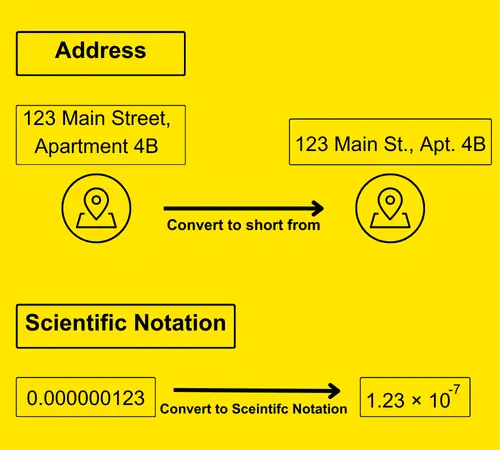
Imagine a big city with many streets. Writing full addresses for each place can take a lot of time. Instead, you use shorter forms. For example, instead of writing “123 Main Street, Apartment 4B,” you might write “123 Main St., Apt 4B.” This makes it quicker and easier to understand.
Similarly, scientific notation helps simplify numbers. For instance, instead of writing “0.000000123,” we can write “1.23 × 10⁻⁷.” This form is shorter and more useful for calculations.
How to Write Scientific Notation in Python?
In Python scientific notation, we use the letter ‘e’ (or ‘E’) to show powers of 10. The ‘e’ stands for “exponent” and is used to work with large or small numbers.
Syntax
number = aEb
ais the base (a float or integer).E(or e) indicates “times ten raised to the power of”.bis the exponent.
When Does Python Automatically Use Scientific Notation?
First, Python checks the number size. Then, it decides whether to use scientific notation. Usually,
- If a number is between 10-4 and 1015, Python will display it in decimal form.
- However, if a number is smaller than 10-4 or larger than 1015, Python will use scientific notation to show it.
Example
In the code snippet, the output of the first number is in decimal format as it is within the specified range, while the other numbers are displayed in scientific notation since they fall outside that range.
# This number is between 10^-4 and 10^15
decimal_number = 123456789.0
# This number is smaller than 10^-4
scientific_number_small = 1.23e-5
# This number is larger than 10^15
scientific_number_large = 1.23e16
print(f'Decimal number = {decimal_number}')
print(f'Small scientific number = {scientific_number_small}')
print(f'Large scientific number = {scientific_number_large}')
Output
Decimal number = 123456789.0
Small scientific number = 1.23e-05
Large scientific number = 1.23e+16
This behavior is related to decimal-point representation and precision handling.
How to Format Numbers in Scientific and Standard Form?
In Python, you can format numbers in both scientific notation and standard form depending on your requirements. You can use methods such as str.format(), f-strings, and libraries like NumPy and Pandas to switch between these forms for better control over the display of numbers.
1. str.format()
The str.format() method allows you to print a number in both scientific notation and standard form. This method is flexible. Therefore, you can format numbers easily. You can convert the Integer to Python scientific notation using {. e} flag with the help of the format() method of string. {. e} converts any float or integer number to scientific notation.
Syntax
"{:e}".format(number){:}: Placeholder for the value.e: Format specifier for scientific notation..nf: Specifies the number of decimal places for standard form.
Example
This code formats the number 9732 into scientific notation and standard form:
num = 9732
print("Scientific Notation:", "{:e}".format(num))   # Scientific form
print("Standard Form:", "{:.2f}".format(num))       # Standard form with 2 decimal places
Output
Scientific Notation: 9.732000e+03
Standard Form: 9732.00
2. f-strings (Modern Method)
f-strings are a simple and modern way to work with text and numbers in Python. They help you insert variables into strings easily. Moreover, you can control how numbers appear in output, such as choosing scientific notation or normal decimal form.
In addition, you can use fixed-point formatting to suppress scientific notation. As a result, numbers look cleaner and are easier to read.
Syntax
f"{value:e}"   # For scientific notation
f"{value:.nf}" # For standard form (n specifies decimal places)n: Number of decimal places (e.g., in “.2f”, “2” means two digits after the decimal).f: Fixed-point notation, displaying the number in decimal form instead of scientific notation.
Example
For example, you can show ten decimal places using a format specifier. This format makes Python display the full number instead of using scientific notation, as shown in the code below:
number = 12300000
print(f"Scientific Notation: {number:e}")  # Scientific form
print(f"Standard Form: {number:.2f}")      # Standard form with 2 decimal places
Output
Scientific Notation: 1.230000e+07
Standard Form: 12300000.00
3. NumPy’s np.set_printoptions()
In NumPy, you can control how numbers are displayed by using the np.set_printoptions() function. By setting suppress=True, you can prevent scientific notation and show the full decimal values instead.
Syntax
np.set_printoptions(precision=n, formatter={'float_kind':'{:e}'.format})  # For scientific notation
np.set_printoptions(suppress=True, precision=n) # For standard formprecision=n: Specifies the number of decimal places.suppress=True:- Ensures numbers are shown in standard form instead of scientific notation.
Example
This code shows how to switch between scientific and standard form for a NumPy array:
import numpy as np
array = np.array([0.00001, 200000])

# Scientific notation
np.set_printoptions(precision=2, formatter={'float_kind':'{:e}'.format})
print("Scientific Notation:", array)

# Standard form
np.set_printoptions(suppress=True, precision=2)
print("Standard Form:", array)
Output
Scientific Notation: [1.00e-05 2.00e+05]
Standard Form: [0.00 200000.00]
4. Panda’s pd.set_option()
In Pandas, you can format DataFrame columns to control how numbers are displayed. By using the pd.set_option() function, you can prevent scientific notation and show the full decimal values.
Syntax
pd.set_option('display.float_format', '{:e}'.format)  # For scientific notation
pd.set_option('display.float_format', '{:.nf}'.format) # For standard form (n specifies decimal places)'display.float_format': Option that sets the format for displaying floating-point numbers.
Example
This code formats a Pandas DataFrame column to display numbers in both scientific notation and standard form:
import pandas as pd
df = pd.DataFrame([0.00001, 200000], columns=['Value'])

# Scientific notation
pd.set_option('display.float_format', '{:e}'.format)
print("Scientific Notation:\n", df)

# Standard form
pd.set_option('display.float_format', '{:.5f}'.format)
print("Standard Form:\n", df)
Output:
Scientific Notation:
        Value
0  1.000000e-05
1  2.000000e+05

Standard Form:
         Value
0     0.00001
1 200000.00000
Quick Comparison of Number Formatting in Python
num = 123000
| Format Type | Format Specifier | Example Code | Sample Output | When To Use |
| Scientific Notation | :e | f"{num:e}" | 1.230000e+05 | When working with very large or very small numbers |
| Scientific Notation (Uppercase) | :E | f"{num:.2E}" | 1.23E+05 | When output needs to match uppercase conventions, such as in reports or exports |
| Standard Decimal Form | :f | f"{num:f}" | 123000.000000 | When you want to remove scientific notation |
| Limited Decimal Places | .nf | f"{num:.2f}" | 123000.00 | When you need controlled precision |
How to Remove Scientific Notation in Python?
Sometimes, you may need to remove or convert scientific notation to standard form in Python. This is common for financial calculations or reports. For this, you can cast the number as an float or decimal or int according to your needs. Python will automatically handle the conversion, but sometimes, for better readability, you might want to format it explicitly.
Example
The code below converts a scientific notation into a float, decimal and integer form using type casting.
import decimal

# Number in scientific notation
number = 1.23e5

# Convert to float
float_value = float(number)

# Convert to decimal
decimal_value = decimal.Decimal(number)

# Convert to integer
integer_value = int(number)

print(f"Float value: {float_value}")
print(f"Decimal value: {decimal_value}")
print(f"Integer value: {integer_value}")
Output
Float value: 123000.0
Decimal value: 123000
Integer value: 123000
The decimal module is helpful because it improves precision handling. Moreover, it preserves significant digits during calculations.
Practice Scientific Notation in Python
You can test all these examples directly in our online Python compiler. Modify the numbers, adjust formatting styles, and see how Python handles floating-point values in real time.
Conclusion
Python scientific notation is very useful for handling large and small values in Python. Therefore, it helps improve data handling, numerical computing, and scientific data processing. In addition, it makes calculations cleaner and more readable. Overall, learning scientific notation helps you write better Python code and work more efficiently with data in real projects.
FAQs
How do you write scientific notation in Python?
In Python, you write scientific notation using the letter e. For example, 1.23e4 means 1.23 × 10⁴, which equals 12300. Therefore, this format helps you write large or small numbers more concisely and clearly.
What does e+ mean in Python?
The symbol e+ means multiplying by 10 raised to a positive power. For example, 1.23e+05 means 1.23 × 10⁵, which equals 123000. In short, the + sign shows that the number is large.
Why is scientific notation useful in Python?
Scientific notation is useful because it simplifies very large values and very small values. As a result, it improves readability and helps in data science, finance, and scientific computing. In addition, it makes numerical calculations easier.
Can you prevent scientific notation in Python?
Yes, by using formatting techniques like f-strings or libraries like NumPy and Pandas, you can force numbers to be displayed in full decimal form, even if they are very small or large.
What is the easiest way to convert scientific notation to standard form?
The easiest way is to convert the number to float or decimal format. For example, Python automatically converts 1.23e4 into 12300.0 when needed. Thus, you can control number display using formatting methods.