
- Why Import from Parent Directory?
- How Python Imports Work? (Quickly)
- Methods to Import from Parent Folder in Python
- Common Import Errors and Fixes
- Best Practices
- Final Thoughts
- Try It Yourself
- FAQs
When working on Python projects, it’s common to organize code into multiple files across folders. But what happens if you need a file to import from parent directory?
You can import from a parent directory in Python in a few simple ways. The cleanest option is to use relative imports inside a proper package with __init__.py files. If you just need a quick fix, you can add the parent folder to sys.path using sys, os, or pathlib. Additionally, you may also set the PYTHONPATH variable, run the file with the -m flag, or install the project in editable mode. For small scripts, modifying sys.path is usually enough, but for larger projects, a proper package structure is a better long-term solution.
Why Import from Parent Directory?
Imagine this project structure:
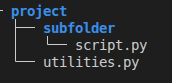
Now suppose script.py needs functions from utilities.py.
If you try to import directly, Python may show this error:
ModuleNotFoundError: No module named 'utilities'
Problem?
Python doesn’t automatically search the parent folder of script.py. That’s why you need special methods to import the file.
How Python Imports Work? (Quickly)
When you write import module_name, Python searches for that module in:
- The current script’s directory.
- The directories listed in
sys.path. - Installed packages (like ones from pip).
Parent directories are not included unless you manually add them or structure your project as a package.
In this guide, we’ll show how to import from a parent folder in Python using the best methods. You’ll learn clear solutions with examples, plus when to use each one.
Methods to Import from Parent Folder in Python
Below are the most common and beginner-friendly ways to import from a parent directory. Let’s go step by step.
Method 1: Add Parent Directory to sys.path
One quick way to make Python recognize a parent directory is to modify the sys.path. The sys.path list determines where Python looks for modules. By adding the parent directory to this list at runtime, you can import the module as if it were in the current folder.
How to do it: In your script, before the import, append the parent directory path to sys.path. For example:
Example:
import sys
import os

# Get the parent directory
parent_dir = os.path.abspath(os.path.join(os.path.dirname(__file__), '..'))

# Add parent directory to sys.path
sys.path.append(parent_dir)

import utilities
Why use it:
- Quick and works in any script.
- Great for small projects.
Drawbacks:
- Temporary. Only affects the running script.
- Can get messy in large projects.
Method 2: Use pathlib (Modern and Clean)
Instead of hardcoding '..', you can use Python’s pathlib library to handle paths more elegantly. The pathlib.Path class provides an object-oriented way to work with file system paths and can easily get the parent folder of the current file.
How to do it: Use Path(__file__).parent.parent to get the parent directory of the current file, then convert it to a string and append/insert to sys.path:
pythonCopyEdit
Example:
import sys
from pathlib import Path

# Get the parent directory
parent_dir = Path(__file__).resolve().parent.parent

# Add parent directory to sys.path
sys.path.append(str(parent_dir))

import utilities
Why use it:
- More readable.
- Works across different operating systems.
- Safer than hardcoding paths.
Method 3: Use sys.path.insert()
Another approach is similar to the above, but using sys.path.insert(). The difference is that insert() lets you specify the position in the search path where the new directory is added.
How to do it: Use index 0 to insert the parent directory at the beginning of the search path:
Example:
import sys
from pathlib import Path

parent_dir = Path(__file__).resolve().parent.parent
sys.path.insert(0, str(parent_dir))

import utilities
Why use it:
- Ensures Python checks your parent directory first.
- Helpful if there are conflicting module names.
Method 4: Use PYTHONPATH Environment Variable
Another way to tell Python where to find modules is by setting the PYTHONPATH environment variable. This is a system-level approach: you add the parent directory to an environment variable, and Python will include that directory in sys.path every time it runs.
How to do it: Set the PYTHONPATH variable to include the path to your parent directory. You can do this in your operating system’s terminal or environment settings. For example:
Example (Linux/macOS):
export PYTHONPATH="/full/path/to/project:$PYTHONPATH"
python subfolder/script.py
Example (Windows):
set PYTHONPATH=C:\full\path\to\project;%PYTHONPATH%
python subfolder\script.py
Why use it:
- No need to modify your code.
- Useful for development setups.
Drawbacks:
- Others running your code must set PYTHONPATH too.
- Can be forgotten easily.
Method 5: Use Packages and __init__.py
Instead of modifying paths in code, you can structure your project in a way that Python can naturally understand the relationships between modules. This involves using an __init__.py file to make directories into packages and then using package imports (including relative imports).
If your parent directory is meant to be a package (or part of one), adding an empty __init__.py file in that directory will tell Python it’s a package. Likewise, ensure there’s an __init__.py in the child directory if you want it to be a sub-package. Then you can use normal import statements.
How to do it: Given our example structure, make sure project/ (the parent directory) contains an __init__.py (it can be empty). Then in subfolder/script.py, do either an absolute or relative import:
Steps:
- Add an empty
__init__.pyfile in theproject/folder. - Make sure you run the script as part of the package.
Example structure:
project/
├── __init__.py
├── utilities.py
└── subfolder/
    ├── __init__.py
    └── script.py
Example import (in script.py):
from .. import utilities
How to run:
python -m project.subfolder.script
Why use it:
- Best for clean, scalable projects.
- Works well for distribution and testing.
Drawbacks:
- You must run scripts as part of the package.
- Requires good project structure.
Method 6: Use importlib (Dynamic Imports)
Python’s importlib library allows you to import a module programmatically from a given file path, which can be useful in certain cases. This method is more advanced and usually not the first choice for simple tasks, but it’s a powerful option. You don’t need to modify sys.path or environment variables; instead, you load the module directly.
How to do it: Use importlib.util.spec_from_file_location to create a module spec from the file, then execute it:
Example:
import importlib.util
from pathlib import Path

module_name = "utilities"
module_path = Path(__file__).resolve().parent.parent / f"{module_name}.py"

spec = importlib.util.spec_from_file_location(module_name, module_path)
module = importlib.util.module_from_spec(spec)
spec.loader.exec_module(module)

result = module.some_function()
Why use it:
- Works without modifying
sys.path. - Good for dynamic or plugin-based systems.
Drawbacks:
- More complex.
- Less readable for beginners.
Common Import Errors and Fixes
| Error Message | Why It Happens | How to Fix |
|---|---|---|
ModuleNotFoundError | Python can’t find the module. | Add parent directory to sys.path or set PYTHONPATH. |
ImportError: attempted relative import with no known parent package | You used relative imports, but ran the script directly. | Run the script as a module (using -m). |
| Still not working? | Wrong paths, typos, or missing files. | Print sys.path and check your directory structure. |
Best Practices
Dos ✅:
- You can use
sys.pathhacks for small scripts and quick fixes. - Moreover, use
pathlibfor cleaner path handling. - Or use packages (
__init__.py) for large, organized projects. - Document if
PYTHONPATHneeds to be set.
Don’ts ❌ :
- Avoid mixing too many methods in one project.
- Don’t forget about naming conflicts. Avoid module names like
random.pyoros.py.
Final Thoughts
Importing from a parent folder in Python is a common need. Luckily, Python gives us several ways to solve this:
- Modify
sys.path. - Use
pathliboros.path. - Set up a package.
- Configure
PYTHONPATH. - Dynamically load with
importlib.
For beginners, the easiest solution is to modify sys.path. As your projects grow, packages and environment variables become cleaner and more scalable solutions.
Choose the method that fits your project, and keep your imports clean and clear!
Discover more Python tutorials, examples, and guides in our Python Syntax Scenarios section.
Try It Yourself
Test these import methods instantly using our Online Python Compiler and experiment with module imports in real time.
FAQs
Can I import files from another folder in Python?
Yes. You can use environment variables like PYTHONPATH to permanently add folder locations. Alternatively, you can use dynamic imports with the importlib module to load files using their full path.
How do I import a class from another Python file?
You can import a class using the import or from keyword.
What is the easiest way to import modules from a specific path?
The easiest way is to add the module path to sys.path or use the pathlib module. Both methods help Python locate your files during runtime. This approach is useful for development and testing purposes.
Which method is best to import from parent directory for professional Python projects?
The best professional solution is using proper package structure with __init__.py files and relative imports. This keeps projects clean, scalable, and easier to maintain over time.
Why doesn’t Python search parent directories automatically?
Because Python’s module resolution only includes the script directory and paths listed in sys.path. This prevents ambiguous imports and keeps behavior predictable.